Required. This defines the number of cycles a subscriber can receive the fee. The options determine if a fee repeats at the end of its duration. (The duration is defined either as the account cycle, if Aligned to account cycle is Yes, or as the fee's Cycle Duration value.) If so, the customer is grandfathered the fee rate and attributes when it is renewed. Select from:
- Unlimited: Subscribers can continue to be charged the fee until they unjoin or the account is terminated.
-
Limited to: Enter the number of cycles that the fee can be charged.
You can enter only positive integers (1, 37, 5287024, etc.) in this field. Zero, negative numbers, and decimal numbers (0, 0.5, 3.1415926, 2.5, etc.) are not allowed.
Fees renew when they are set to an unlimited number of cycles or when they are "limited" to more than one cycle, that is, the number in the Limited to option is greater than 1. Renewing means that at the end of a fee cycle's duration:
- The cycle starts over.
- Billing occurs.
Required. Determines the entity to which the fee is associated. Select from:
- Account Fee - When the fee is assessed, it is charged to the account. The fee can be assessed as long as the account is active (including when the account is suspended). The fee is removed only when the account is deactivated or the Number of Cycles is exhausted.
- Subscriber Fee - When the fee is assessed, it is charged to the account per subscriber on the account. The fee can be assessed as long as the subscriber is joined to the account (including when the subscriber is suspended). The fee is removed only when the subscriber is unjoined or the Number of Cycles is exhausted.
Required. This defines how long a fee cycle is. Available only when Aligned to account cycle is set to No. Select from:
- Unlimited. This would be the same as selecting Limited to and entering 1 in Number of Cycles and would mean that the fee is assessed only once. If selected when Unlimited is selected in Number of Cycles or if the Limited to value in Number of Cycles is greater than 1, will generate an error.
-
Lasts, then enter a number and select a unit of measure from minute(s), hour(s), week(s), day(s), or month(s) (default). This sets the time period between fee assessments.
Required. This is proration, This is proration, and it defines how much of the fee is billed for the first cycle. Available only when Aligned to account cycle is set to Yes.
For fees, there is no "usage," only possible duration. This setting for fees determines whether or not fee duration information will be visible. Select:
- Custom: To select what type of duration data your subscribers will see for this fee.
- Default: To use the default usage display property, which shows fee duration.
Custom Usage Display Options Choices
| Usage Display Property | Definition | Example |
|---|---|---|
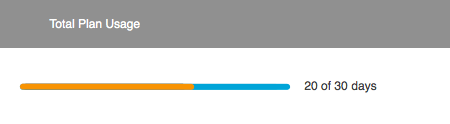
| Duration |
Shows the amount of time used and the total time available. Default for fees with limited duration. |
 |
| None |
Shows the fee name only. Default for fees with unlimited duration. |
|


Determines whether on not the fee is visible to customers.
If this is set to No, the fee is not visible in a customer's account information. It is not shown as part of a bundle when included in a bundle.